Diagnose any reefer
in minutes.
The professional web app for refrigerated-transport technicians. Instant alarm codes, AI repair guidance grounded in your service manuals, zoomable wiring diagrams, in-browser unit downloads and live Bluetooth readings — for Carrier, Thermo King and Schmitz Cargobull units. Nothing to install.
Alarm Codes
Everything you need, right in the truck.
Purpose-built for field service — fast, reliable, and grounded in your actual manuals. It works the way technicians actually work.
Smart alarm lookup
Look up any Carrier, Thermo King or Schmitz Cargobull alarm code and get the real description, severity, likely causes and manufacturer guidance — plus a plain-English AI explanation of how to fix it.
AI repair guide
Ask any repair or how-to question. The AI searches your service manuals and answers step-by-step with citations you can tap to verify — never a random guess.
Wiring diagrams + AI
Real wiring & schematic diagrams by unit model. Pinch, zoom and pan into any section, tap “Explain” for an AI walkthrough that reads the actual drawing, and ask it about the circuit.
In-browser unit downloads
Pull a unit’s on-board download straight into the browser — no separate laptop needed — then let the AI read the temperatures, alarms and run data and tell you what it means.
Live Bluetooth readings
Read a running Thermo King unit live over Bluetooth — setpoints, return & discharge air, battery, engine hours — and save it to the unit’s history.
Driver QR fault reports
Drivers scan a QR sticker on the unit, snap a photo of the alarm, and the AI triages it — so the workshop knows what’s coming before the truck arrives.
Exactly how the app works.
No jargon, no guesswork. Here is what each part does and why it saves you time on the unit.
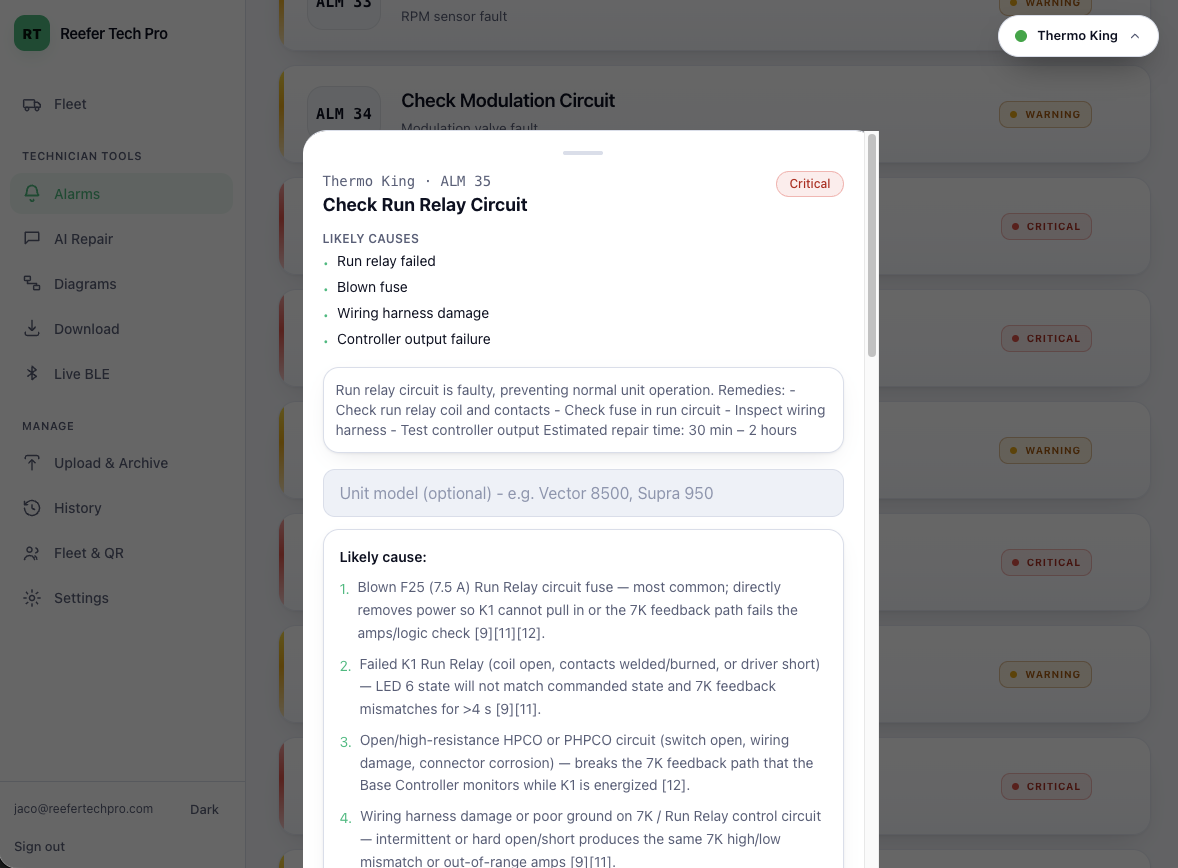
Every code, decoded and ranked
Type an alarm number or a keyword and Reefer Tech Pro shows the real fault name, what it means, and how serious it is — colour-coded critical, warning or info so the worst faults jump out first. Each brand keeps its own database, so a Carrier code never gets confused with a Thermo King one.
- ✓ Search by code or plain-English symptom
- ✓ Likely causes and manufacturer guidance for each code
- ✓ Codes are cached, so lookups still work in a weak-signal depot
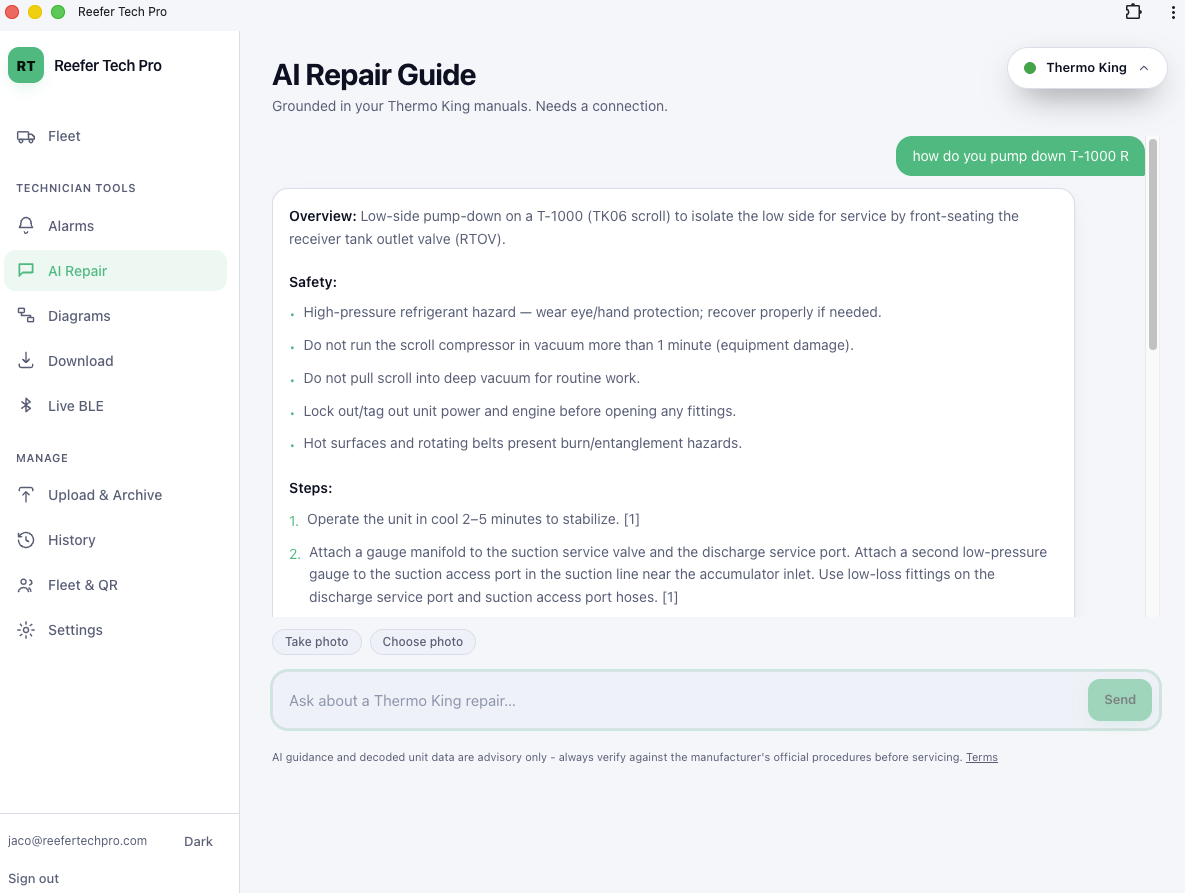
A repair guide that reads your manuals
Ask a question the way you'd ask a senior tech — "why is ALM 10 tripping?" — and the AI searches your service manuals, then answers step by step. Every answer carries citations you can tap to jump to the exact manual page, so you always confirm before you wrench. You can even snap a photo of the unit and ask about what you're seeing.
- ✓ Grounded in your manuals — not random web data
- ✓ Tap any citation to verify the source
- ✓ Attach a photo and ask about it directly
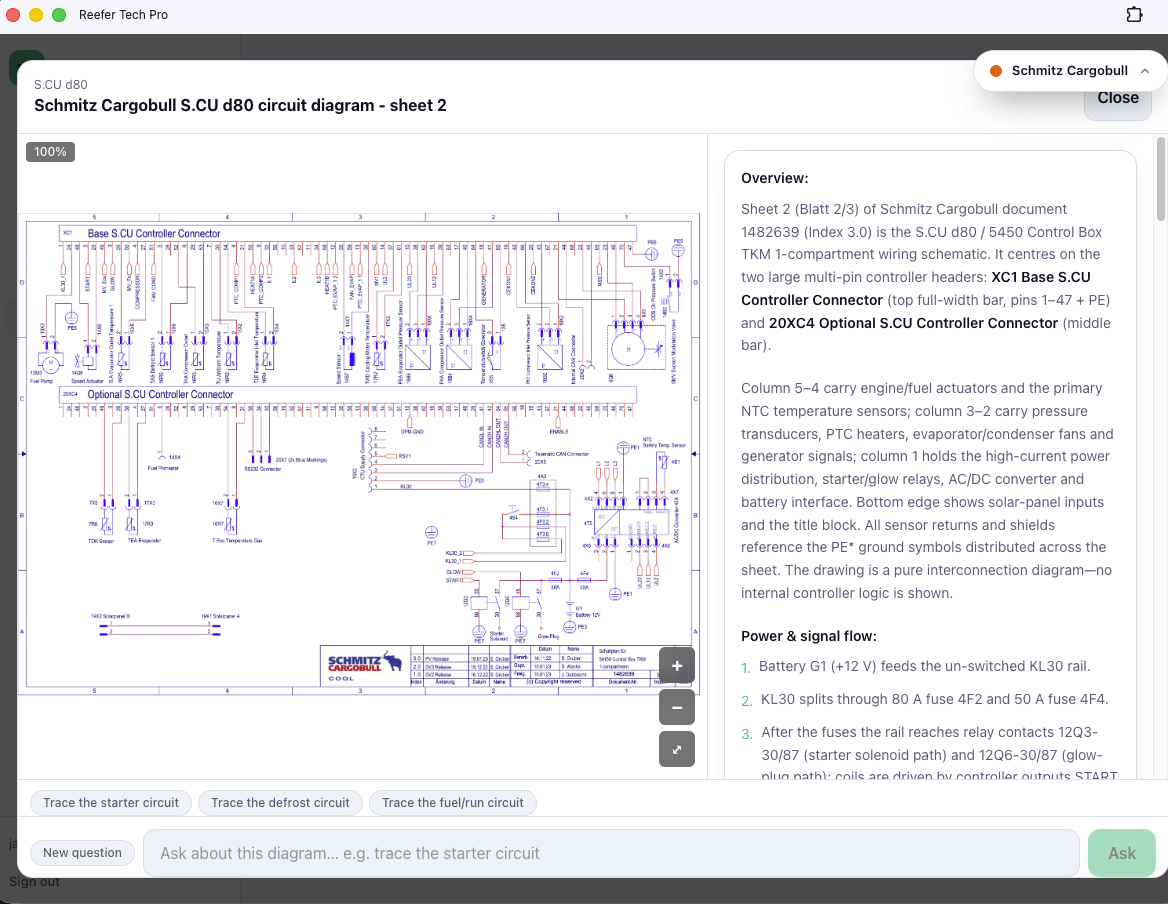
Schematics you can actually read on a phone
Wiring and schematic drawings are organised by unit model. Pinch to zoom into a connector, pan across the circuit, and tap “Explain” — the AI reads the actual drawing and walks you through what each part does. Ask follow-up questions about any circuit without leaving the diagram.
- ✓ Real drawings by unit model, not generic PDFs
- ✓ Pinch-zoom and pan on any device
- ✓ AI explains the circuit you're looking at
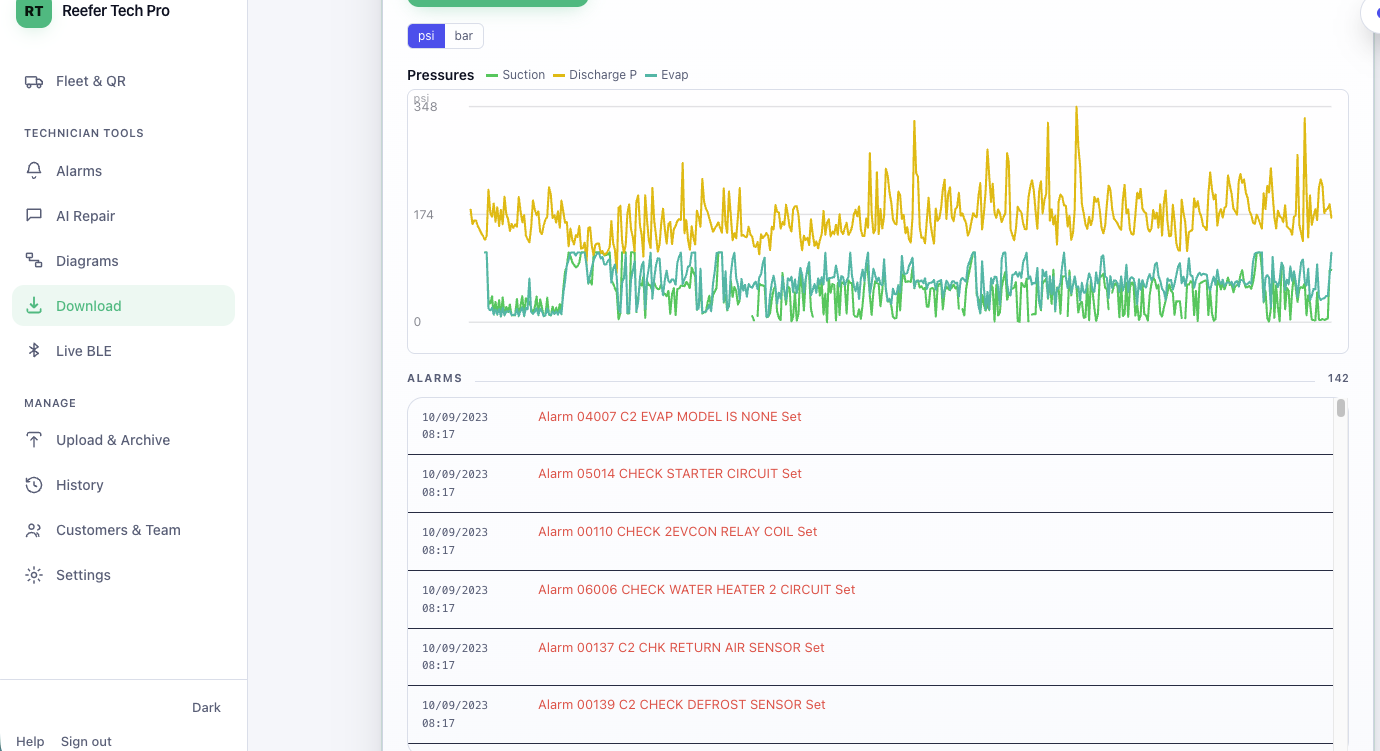
Pull the unit's data without a laptop
Plug a USB-to-serial cable into the unit and pull its on-board download straight into the browser — or drop in a download file you already have. The AI then reads the temperatures, alarms and run history and tells you what it means. Works on a computer, on Android, and on your Reefer Tech Pro Raspberry Pi 5 when you're on an iPhone or iPad.
- ✓ Carrier and Thermo King downloads supported
- ✓ No separate manufacturer laptop needed
- ✓ AI reads the data and flags what matters
Watch a running unit over Bluetooth
Connect to a running Thermo King unit over Bluetooth and watch it live — zone setpoints, return and discharge air, battery voltage, engine and total hours — updating as the unit runs. Every reading is saved to that unit's history, so you build a real record over time instead of losing it.
- ✓ Live temperatures and unit vitals
- ✓ Readings saved to the unit's history
- ✓ Runs on a phone or your Reefer Tech Pro Raspberry Pi 5

Faults reported before the truck arrives
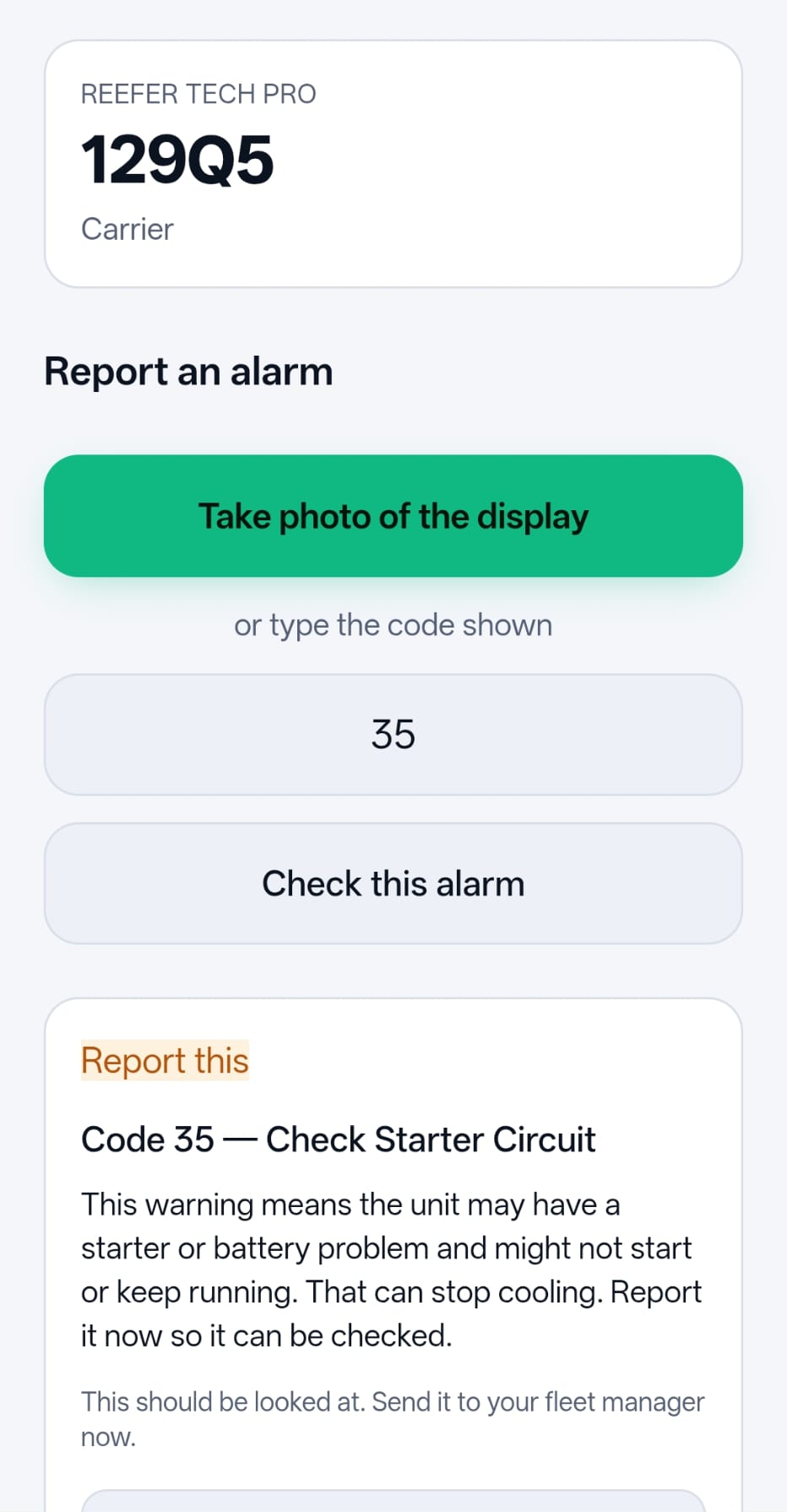
Put a QR sticker on each unit. When a driver sees an alarm, they scan it, snap a photo, and send it — no app or login needed. The AI does a first-pass triage and the report lands in the fleet's inbox, so the workshop knows what's coming and can plan the fix before the truck rolls in.
- ✓ No app or account for drivers — just scan
- ✓ Photo kept with the report
- ✓ AI triage plus a fleet inbox for the office
A record for every unit
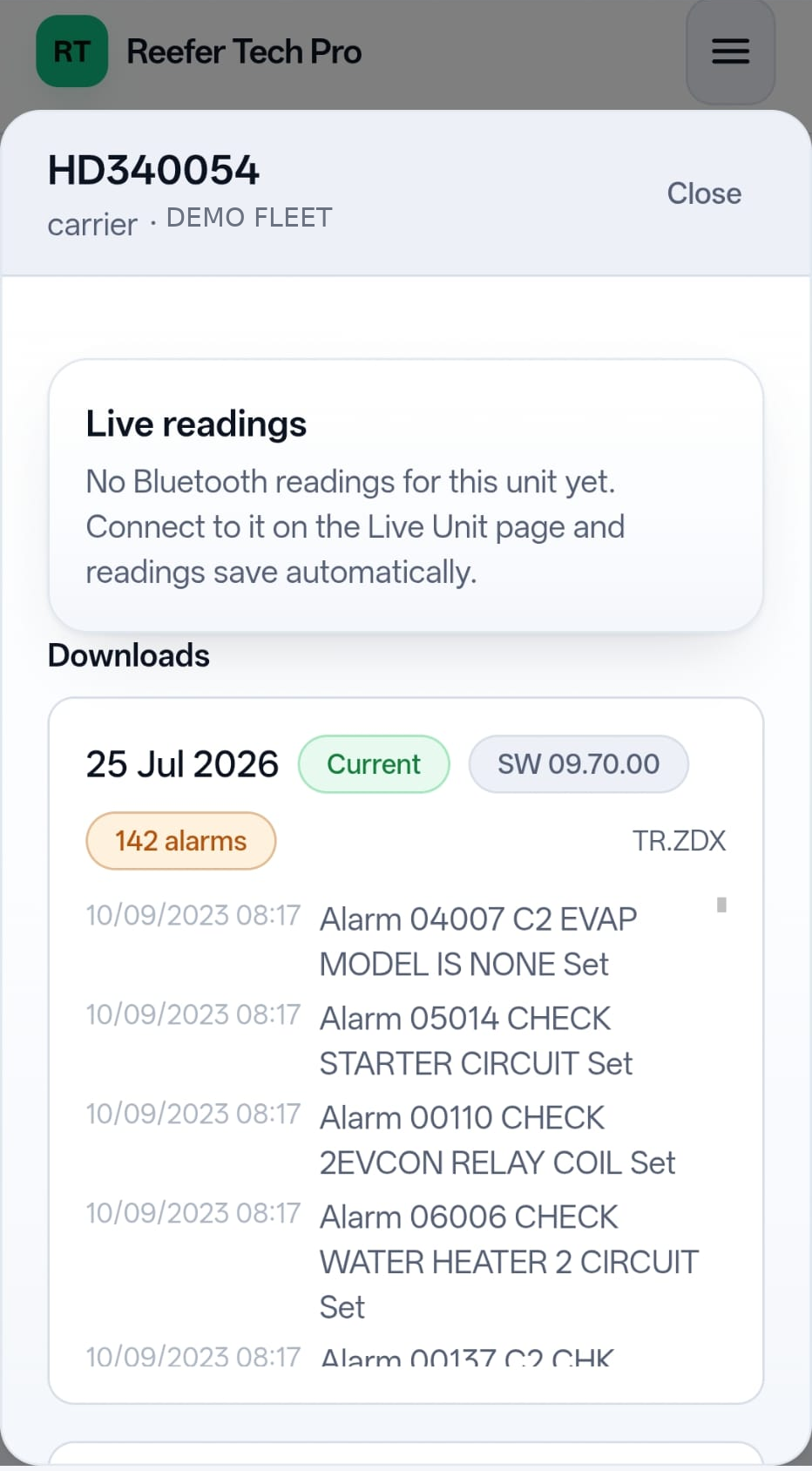
Every download and live reading is stored against the unit, so you can pull up any reefer's history — past alarms, temperatures and readings — in one place. Patterns that used to disappear into paperwork stay visible, which makes recurring faults far easier to catch.
- ✓ Downloads and readings kept per unit
- ✓ Spot recurring faults over time
- ✓ Private to your fleet
Every job on a unit, written down
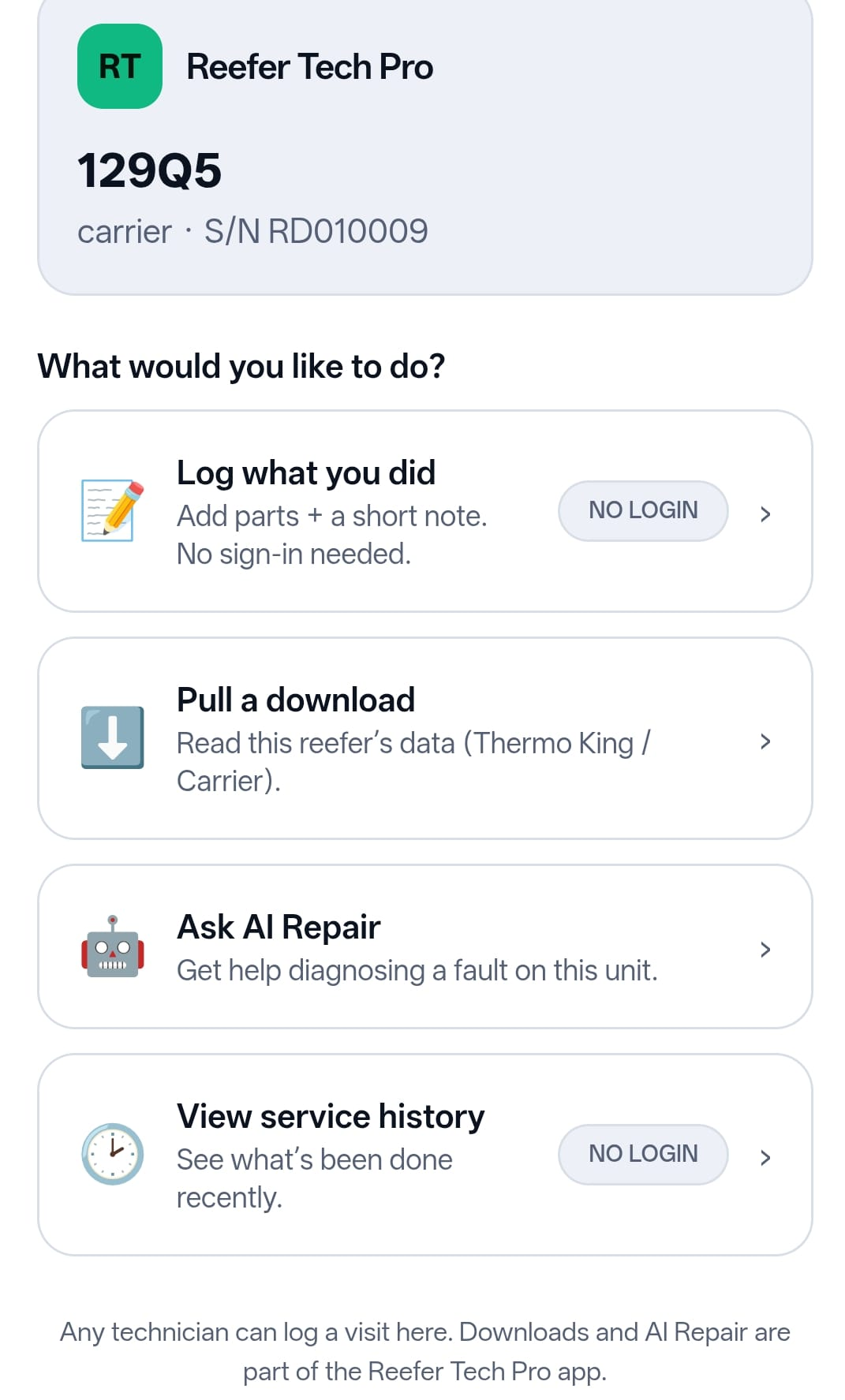
A second QR sticker lets any technician — yours, or a contractor from another company — log what they did and which parts they fitted. No account, no app to install. Entries wait for your approval before they join the unit's history, so nothing lands on the record unchecked.
- ✓ Works for any technician, any company
- ✓ Parts fitted, hours and a short note
- ✓ You approve before it's recorded
What needs attention, today
One screen for the exceptions instead of the whole fleet: urgent driver reports, service logs waiting on you, units that haven't been seen in a while, alarms that keep coming back on the same unit, and temperatures drifting from setpoint. The recurring-fault view is the one that tends to pay for itself.
- ✓ Urgent reports and pending logs first
- ✓ Repeat alarms grouped by unit
- ✓ Plain-English summary of the last 30 days

Your whole fleet, in one go
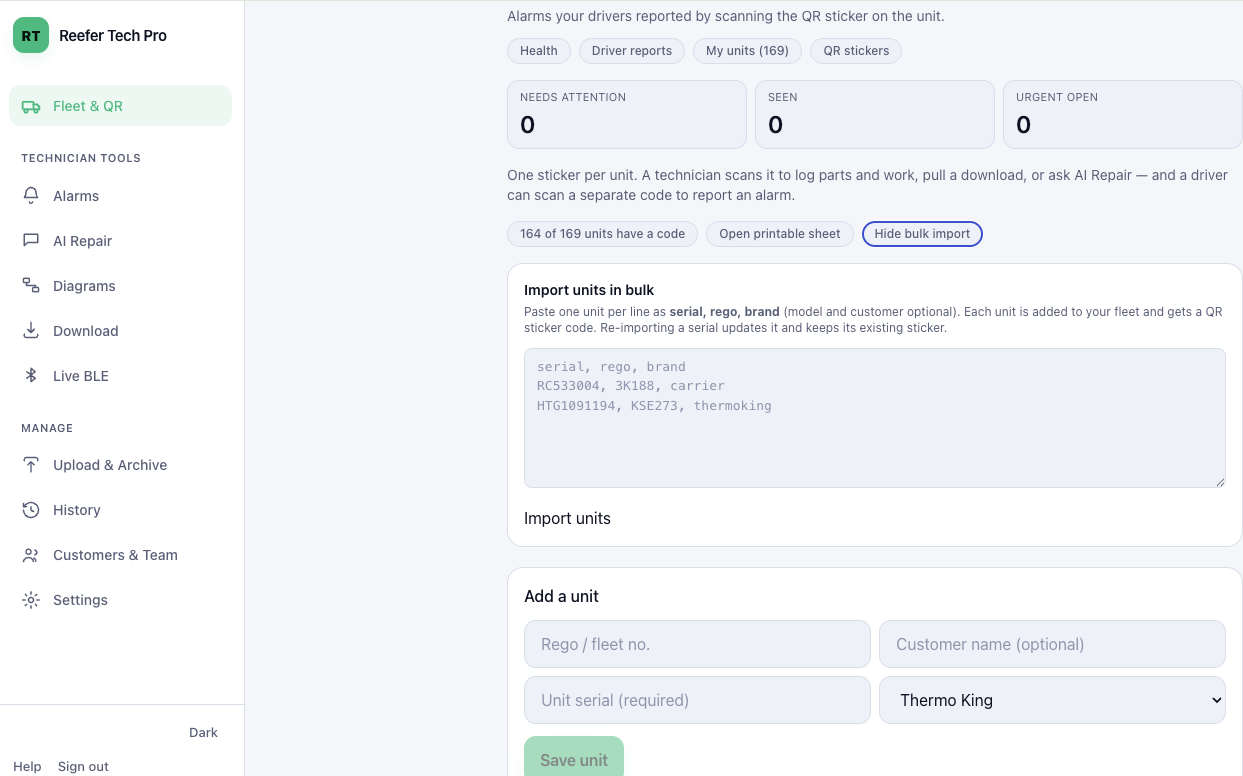
Paste your unit list straight in — serial, registration and make, one unit per line — and every unit comes back with its QR codes ready to print. Your fleet stays yours: nothing is shared with another customer, and nothing is pulled in from anywhere else.
- ✓ Paste one unit per line, straight from your spreadsheet
- ✓ QR codes generated for every unit
- ✓ Private to your fleet
Add the documents only you have
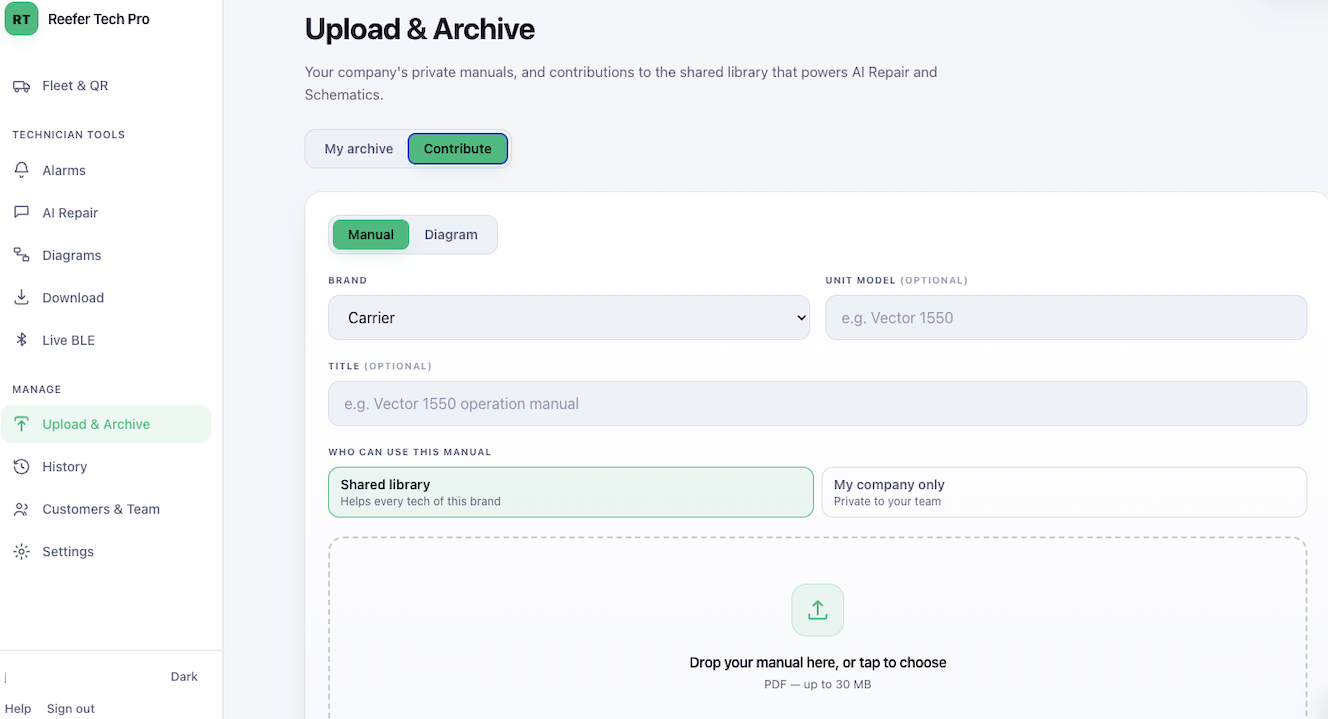
Upload your own service manuals, bulletins and job sheets. The AI reads them alongside the built-in library, so answers can cite the documents your fleet actually works from — including the ones no one else has.
You choose for each document: keep it private to your company, or contribute it to the shared library so every technician working on that brand benefits. Private documents are never shown to another customer or used to answer their questions.
- ✓ Your manuals, searchable by the AI
- ✓ Answers cite your own documents
- ✓ Private to your company, or shared — your call
The right view for every job.
One account per person, each seeing exactly what they need — nothing more. You decide who gets which.
Fleet manager
Full control of your fleet, your units and your team — plus every technician tool.
- ✓ Fleet overview, unit history & QR stickers
- ✓ Driver fault reports as they come in
- ✓ Review and approve technician service logs
- ✓ Import your fleet in one go
- ✓ Upload your own manuals, private or shared
- ✓ Add or revoke team access
- ✓ All technician tools included
Technician
Everything needed to diagnose and fix — on phone, tablet or laptop.
- ✓ Alarms & AI Repair
- ✓ Diagrams & downloads
- ✓ Live Bluetooth readings
Dispatch
Oversight without the hands-on tools — useful for coordinators who need to see, not fix.
- ✓ Fleet alarm status
- ✓ Driver fault reports
- ✓ Unit history
From alarm to repaired, fast.
Pick your brand
Choose Carrier, Thermo King or Schmitz Cargobull. The app loads the right alarm database and manual library.
Look up the alarm
Enter the code for the full description, severity and causes — then get an AI explanation of the fix, cited from the manual.
Open the diagram
Pull up the unit's wiring schematic, zoom into the circuit, and ask the AI what any part of it does.
Fix with confidence
Follow grounded, step-by-step guidance and tap the source to confirm against the manual before you wrench.
Technicians deserve better tools.
Every minute of reefer downtime puts cargo at risk. Reefer Tech Pro turns hours of manual-flipping into seconds.
Today's reality
- ✕ Hundreds of alarm codes across three brands — impossible to memorise.
- ✕ Flipping through paper manuals in the field wastes critical repair time.
- ✕ Downtime costs mount every minute a unit isn't diagnosed correctly.
- ✕ Wiring diagrams buried in PDFs you can't read on a phone.
With Reefer Tech Pro
- ✓ Instant lookup of any Carrier, Thermo King or Schmitz Cargobull alarm code.
- ✓ AI repair guidance grounded in your manuals, with citations.
- ✓ Open unit downloads in the browser — even on your phone — with AI analysis.
- ✓ Zoomable wiring diagrams with an AI that reads the drawing.
Licensed to your fleet, not your techs.
Sold per fleet, not per technician. Your team gets the full diagnostic suite; access stays under your control.
Per-fleet licensing
One contract covers your whole team. Add or remove technicians anytime — access follows the fleet, not the individual.
Revoke when techs leave
When a technician moves on, revoke their account in seconds. No risk of access lingering on a personal device.
Clear pricing
One licence for your whole team, quoted to fit your fleet. No per-technician surprises.
Manuals tuned to your fleet
We integrate your unit-specific manuals so the AI answers in your fleet's context, not generic web data.
Free to try, hands-on to scale
Individual techs can start free in seconds. For fleets, we help set up your team and stay on call.
Works everywhere
Any modern browser, any device. Alarm data is cached for weak-signal depots and remote sites.
Simple per-fleet pricing.
Priced on the size of your fleet, not the size of your team — add as many people as you need at no extra cost. Start with a free trial, then email us and we'll quote your fleet.
Starter
Up to 25 units. The whole app — alarms, AI repair, diagrams, downloads, live readings, driver QR reports, service logs and unit history. Unlimited people on your team.
Email for pricing →Pro
26 to 150 units. Everything in Starter, with priority support and help getting your fleet loaded and stickered.
Email for pricing →Enterprise
Over 150 units, or multiple depots. Everything in Pro, plus manuals tuned to your fleet and hands-on onboarding.
Contact us →Free trial on sign-up. Plans renew each month until you cancel — cancel any time. No app-store download.
Tell us about your fleet.
Depots, technicians, unit mix — we'll reply within one business day with a quote and onboarding plan. Or email us directly at jaco@reefertechpro.com.